How to add music to a TikTok slideshow
How to add music to a TikTok slideshow in the app, which sounds a business account can use, and what happens to the sound when an app posts your slides.
· Updated · 6 min read · by Reelazy

Adding music to a TikTok slideshow takes three taps. What trips people up is everything around them: why the song you want isn't in the list, why a slideshow posted by an app has a sound you didn't pick, and why a draft in your inbox has none.
This page covers the steps first, then the rules for business accounts, then what changes when an app posts your slideshow for you.
How to add music to a TikTok slideshow in the app
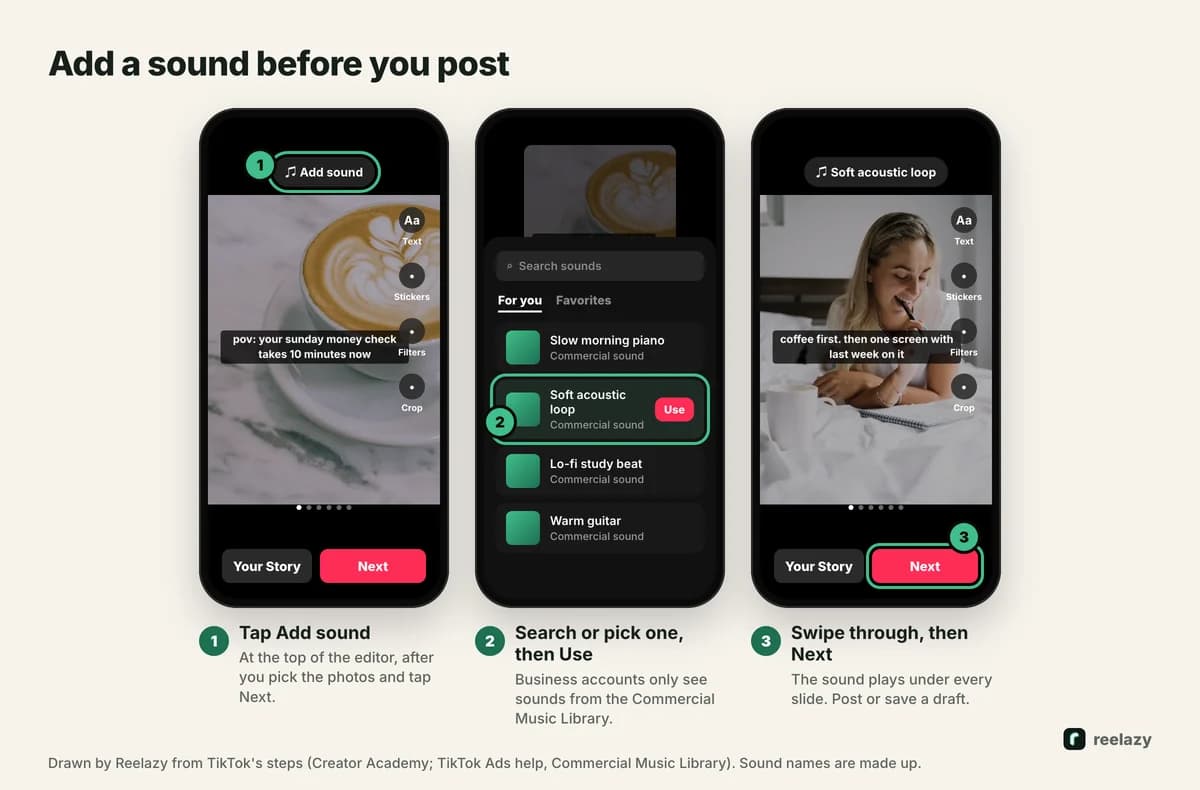
- Make the slideshow in photo mode. Tap +, then Photo, then Upload, and pick your slides in order (the full steps). Tap Next.
- Tap Add sound at the top of the editor. TikTok's Creator Academy lists sound with the other edits on this screen: filters, text, stickers and cropping (photo posts, updated July 3, 2026).
- Pick a sound. Scroll the suggestions or search by name, then select it. One sound plays under the whole slideshow while people swipe.
- Swipe through a few slides to check that the sound fits the words, then tap Next, write the description and tap Post.
Which sounds you can use on a business account
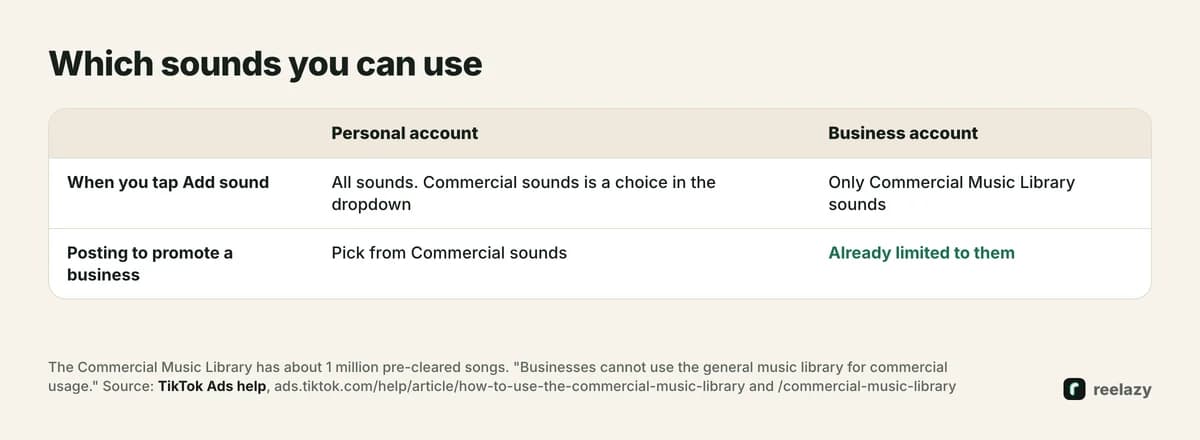
TikTok splits its music in two:
- The Commercial Music Library: about 1 million songs, pre-cleared and "free for businesses to use" (TikTok Ads help, July 2025).
- The general library: everything else. TikTok's help page is plain about it: "Businesses cannot use the general music library for commercial usage."
On a business account, when you tap Add sound you only see Commercial Music Library sounds. On a personal account you see everything, and you can choose Commercial sounds from the dropdown in the sounds list to see only those (how to use the Commercial Music Library, July 2026). TikTok's Creator Academy gives the same advice for photo posts: pick a "commercially available" sound or one you have licensed.
So if your account promotes an app or a product, pick from commercial sounds, whatever kind of account it is. TikTok's terms for the library treat commercial sounds as the ones available for commercial use, so switching a brand account to personal to reach the full library doesn't make the other songs fair game.
Choosing a sound for a slideshow
People read a slideshow. The sound sets the mood under the words, so it shouldn't compete with them.
- Text-heavy slides (tips, steps, lists): a calm instrumental. Lyrics fight the words on screen.
- Story or POV posts: something with a little tension or warmth, matching the story's turn.
- Before and after, or a reveal: something with more energy, since the post is about the change.
Keep a short list of five or six commercial sounds that suit your account, and rotate them. It saves searching every time and gives your posts a recognisable feel.
Adding music when an app posts your slideshow
Apps post to TikTok through its official Content Posting API. For photo posts it has exactly one music setting, auto_add_music, and no way to pick a track.
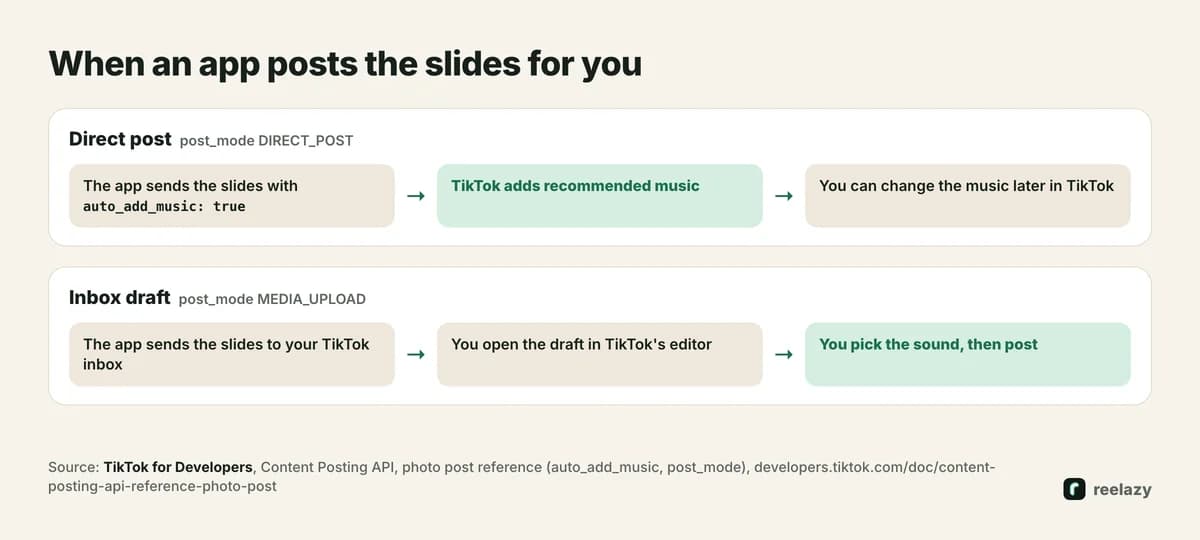
- Direct post. The app posts straight to your profile. With
auto_add_musicon, TikTok adds recommended music, and TikTok's reference says you can change the music later in TikTok. The setting only works for direct posts. - Inbox draft. The app sends the slides to your TikTok inbox. You open the draft in TikTok's editor, add the sound you want, and post. This is the way to use a specific sound. TikTok allows at most 5 drafts waiting in 24 hours per account (upload reference).
The full picture of what an app can and can't do is in the TikTok Content Posting API for photo posts.
In Reelazy, each account sends posts one of those two ways. With Inbox, each post lands in your TikTok inbox at its time and you add the sound. With Direct, it goes to your profile at its time, and Let TikTok add recommended music is a choice you make when you approve the posts (Inbox or Direct). Either way, Reelazy copies the format of a slideshow that works and makes a month of posts like it for your app, which you approve before anything goes out.
When the music doesn't work
- The song you want isn't there. You are on a business account, and it isn't in the Commercial Music Library. Pick a similar commercial sound.
- A slideshow posted by an app has a sound you didn't choose. It was a direct post with recommended music turned on. Change the music in TikTok, or turn the option off for the next ones.
- An inbox draft has no sound. Expected: drafts from an app arrive without one. Add it in the editor before you post.
- You want to change the sound on a post you made yourself. TikTok's help pages we checked don't describe this for photo posts. Open the post's menu in your app version and look for an edit option. If there is none, delete the post and post it again with the new sound.
Music is the last touch. The hook and the slides are what people stop for: the TikTok hooks library, 16 slideshow ideas and the TikTok photo slides guide cover those. Example months for budgeting apps and meditation apps show the whole thing. Start free: Free includes 2 posts you can schedule to TikTok.
Frequently asked questions
How do I add music to a TikTok slideshow?
After you pick the photos in photo mode and tap Next, tap Add sound at the top of the editor. Pick or search a sound, select it, then tap Next and Post.
Why can't I find a song for my TikTok slideshow?
On a business account TikTok only shows sounds from its Commercial Music Library, about 1 million songs cleared for businesses. Songs outside it don't appear, and TikTok says businesses can't use them for commercial purposes.
Can I add music to a TikTok slideshow after posting?
When TikTok added recommended music to a direct post from an app, its developer docs say you can change the music later in TikTok. For a post you made yourself, check the post's menu in your app version; if there is no edit option, repost it with the new sound.
Can an app add a trending song to my TikTok slideshow?
No. TikTok's API lets an app ask for TikTok's recommended music on a direct post, and nothing more. For a specific song, have the app send the slides to your TikTok inbox and add the sound yourself.
Does a TikTok slideshow need music?
TikTok doesn't require it. Its Creator Academy suggests choosing a soundtrack for photo posts, and a slideshow without sound feels unfinished to most viewers.