TikTok photo slides: the complete guide for 2026
Sizes, safe zones, how many images to use, what TikTok does with the music, and a repeatable way to turn one product into a week of photo posts.
· Updated · 6 min read · by Reelazy
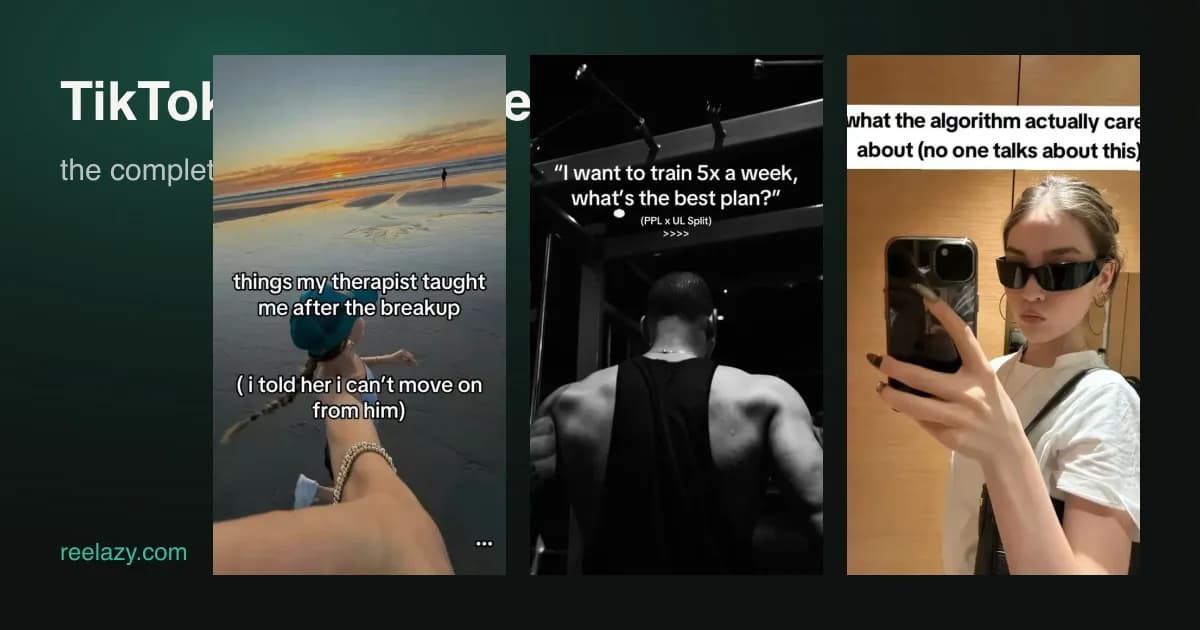
TikTok photo slides (the app calls it Photo Mode, most creators say "carousel") are the cheapest format on the platform that still reaches the For You feed. No filming, no editing timeline, no voice. A stack of 1080×1440 images with a few words on each, and TikTok adds the music.
This guide covers what actually matters when you make them for a product: the exact sizes, where text gets covered by the app, how many slides to use, and a workflow that produces a post in minutes instead of an afternoon.

What a photo slide post is
A photo post is a set of 2 to 35 images that viewers swipe through by hand, or that TikTok auto-advances when the post is shown in the feed. It gets the same distribution as video: For You recommendations, sounds, comments, shares, saves. Since 2024 TikTok has been pushing the format hard because it keeps people on the app longer per view. That is why you see recipe cards, "3 mistakes" lists and before/after stacks from accounts that have never posted a video.
For a small business it solves the two problems that stop most people from posting: you do not need to appear on camera, and you do not need to edit video.
Sizes that work
| Setting | Use this | Why |
|---|---|---|
| Canvas | 1080 × 1440 px (3:4) | TikTok shows photo posts in a 3:4 window. A 9:16 slide is centre-cropped and loses about 12% at the top and bottom. |
| Format | JPEG, under 20 MB each | TikTok's API rejects PNG for photo posts, and the app recompresses anyway. |
| Slides | 5 to 8 for content, up to 35 allowed | Completion rate drops after slide 8 unless every slide earns the next swipe. |
| Text size | 55 px or larger at 1080 wide | Smaller text is unreadable on a 6-inch screen with feed compression. |
| Fonts | Bold, sans-serif, high contrast | Thin fonts disappear on photos. Add an outline or a dark box. |
Every new deck Reelazy makes is already 1080×1440 JPEG, so the numbers above are the defaults, not something you set. The full measurements are in TikTok photo post size.
The safe zone: where text gets covered
This is the mistake we see most. Photo posts are not shown full screen like videos: the app draws the picture in a 3:4 window, with the caption, sound and page dots on a panel below it. Only two things sit on top of the picture, and anything you place under them is hidden.
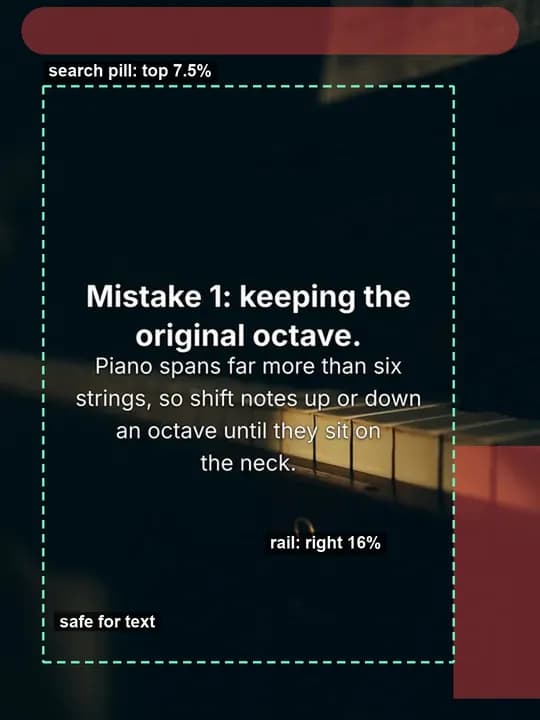
Measured on real photo posts in September 2026, on a 1080 × 1440 slide:
- Top 7.5 percent: a search pill ("Find related content"). Keep text below 12 percent, about 175 px.
- Bottom-right corner: the action rail (avatar, like, comment) in the right 16 percent of the width, from about 62 percent of the height down.
- Left 8 percent: nothing is drawn there, but text touching the edge looks cramped.
That leaves a usable area of about 820 × 1150 px. Put your headline in the upper half of that box and keep the bottom-right corner for the photo. If you still design at 9:16, keep text between 20 and 70 percent of the height: the rest is cropped off in the feed.
Reelazy's editor draws this overlay on the canvas while you work and snaps text to its edges, so you do not have to measure.
How TikTok picks the music
You cannot attach a sound through the API, and the app's "Auto add music" toggle chooses one for you when the post is published. Two things to know:
- The auto-picked sound is usually a trending, licensed track, which is good for reach and safe for business accounts.
- You can change it after posting from the app: open the post, tap Edit, choose a sound. Nothing about the images changes.
If a specific sound matters to your niche, post the slides, then swap the sound inside TikTok within the first hour, before the post has gathered most of its impressions.
Structure that gets swipes
The feed shows your first slide as a still. It has one job: make the thumb move. A structure that works for products, in order:
- Hook (slide 1). One specific promise or tension in under 14 words. "The lip tint that survives a coffee" beats "Our new lip tint".
- Context (slide 2). Who this is for and why the old way fails.
- Three points (slides 3 to 5). One idea per slide, concrete, with a photo that matches.
- Product (slide 6). The product as the answer to the three points. Your own photo, not stock.
- Call to action (last slide). One action: save, follow, comment a keyword, or link in bio.
Avoid the two failure modes: a first slide that is the product photo with the price (nobody swipes), and slides so full of text that they read like a brochure. Twelve words per slide is a good ceiling.
Photos: yours versus stock
Stock photos are fine for hook and context slides, where the image sets a mood. For the product and call-to-action slides, use your own photos. Viewers can tell, and TikTok's comments will say so. Phone photos in daylight against a plain background work better than studio shots, because they match the rest of the feed.
If you only have one good product photo, use the same photo on every slide and change the text. It is a recognisable TikTok look, and consistency reads as intentional.
Posting limits and multiple accounts
If you publish through the official TikTok API, as Reelazy does, two limits apply per account:
- 6 direct posts per 24 hours. Posts sent to the TikTok inbox as drafts do not count.
- 35 images per post.
The API also lets one dashboard publish to several TikTok accounts without sharing passwords, because each account authorises the app itself. That is how agencies and multi-brand sellers run five or ten accounts from one place without getting flagged for unofficial automation.
A repeatable workflow
Here is what a week looks like when photo slides are the main format:
- Monday, 20 minutes. Write one line about the product and one about the buyer. Ask for five hook ideas. Keep two.
- For each hook. Approve an outline (title, hook, one line per slide, call to action), then generate the deck. Swap in your own photos on the product slide.
- Check the safe zone, adjust text size if a line wraps into the right rail, export.
- Schedule the posts across the week, one per day per account, at the hour your audience is on.
- Friday. Look at which first slide got the most swipes, and write next week's hooks in that direction.
The whole loop is the reason Reelazy exists: describe the product in chat, approve the outline, edit slides with the TikTok overlay, and post or schedule to every connected account.
Frequently asked questions
Do photo slides get less reach than video? Not in our posts and not in the accounts we track. They get fewer views per impression on average, but far more saves, and saves are what TikTok uses to keep showing a post.
Can I add my own music? Not through the API. Post first, then change the sound in the app.
What if my text is in Vietnamese or another language with accents? Use a font that ships those glyphs. In Reelazy, Inter, Montserrat, Be Vietnam Pro, Anton and Oswald all render Vietnamese correctly; Bebas Neue and Poppins do not.
How many slides should a product post have? Six. Hook, context, three points, product with call to action. Add slides only when each one adds a reason to swipe.
Want slides like the ones in this article? Make them in Reelazy — describe your product, approve the outline, post to TikTok.