How to make a slideshow on TikTok, step by step
How to make a slideshow on TikTok in photo mode: the six taps in the app, the slide size that isn't cropped, music and text, and posting from an app.
· Updated · 7 min read · by Reelazy

To make a slideshow on TikTok you use photo mode: a post of still images that, in TikTok's words, viewers "swipe through at their own pace". Making one takes six taps in the app. Making one people finish takes a little more: the right size, a hook on the first slide, short text, and a sound.
This guide follows the steps TikTok gives in its Creator Academy (photo posts, updated July 3, 2026), then covers the parts most step-by-step guides skip. The example is a made-up budgeting app, @yourapp, and its post "How I check my budget in 10 minutes a week".
How to make a slideshow on TikTok in the app
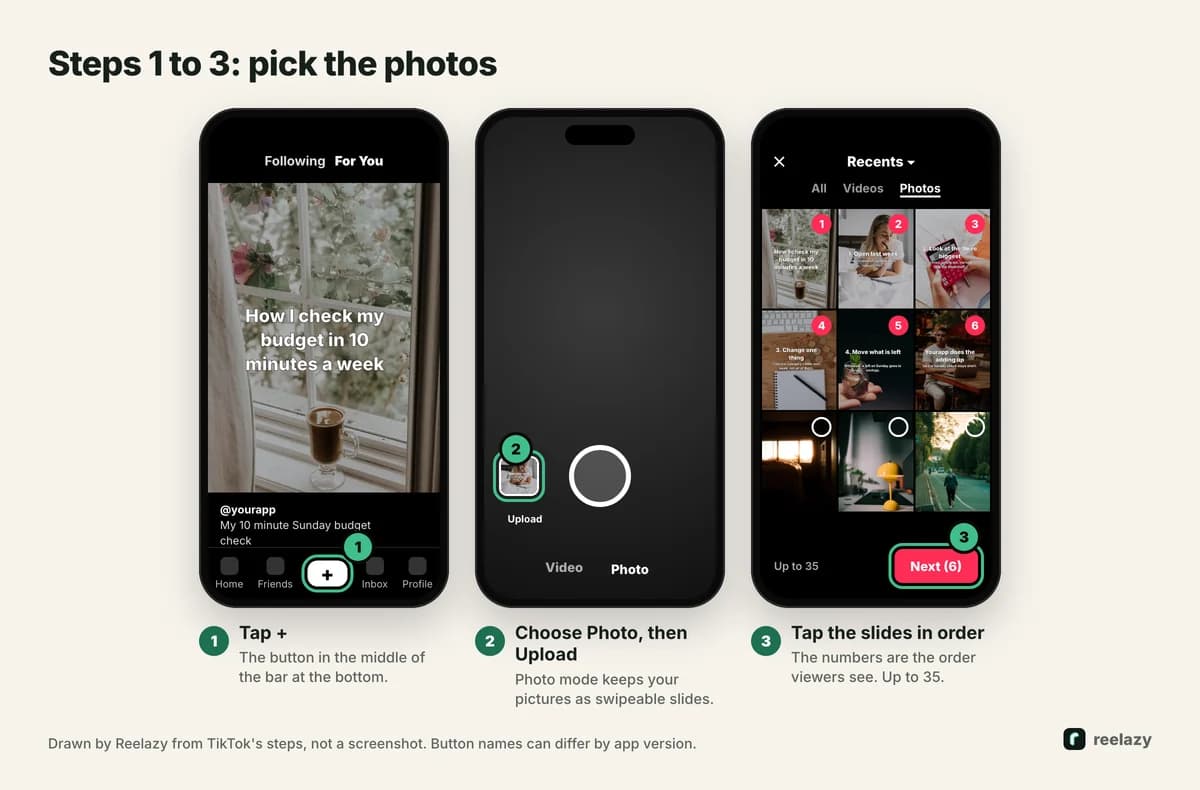
- Tap + at the bottom of the screen.
- Tap Photo, then Upload to pick photos from your phone. Photo mode keeps them as slides people swipe. If your pictures start playing as a video with transitions, go back and make sure Photo is selected.
- Tap the photos in the order you want them shown. The numbers on the thumbnails are the order. TikTok allows up to 35 images in one post. Tap Next.
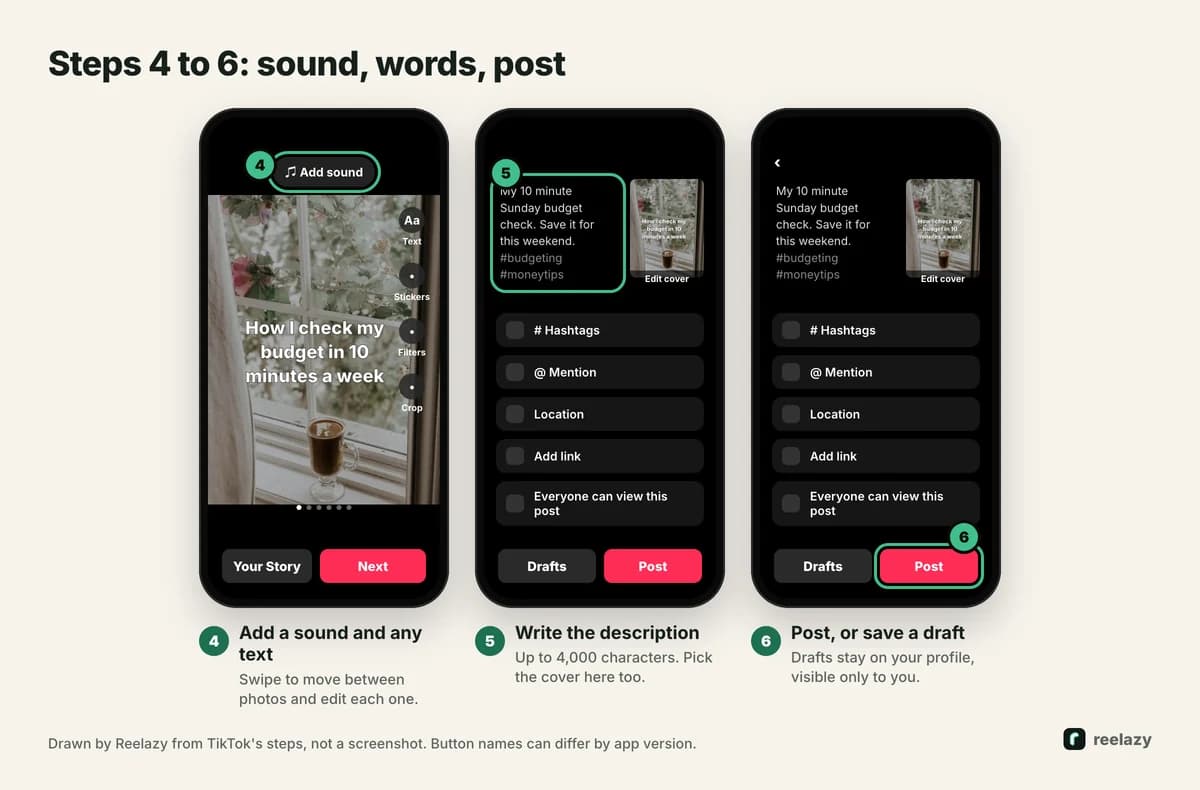
- Edit each slide. Swipe to move between photos. You can add a filter, a sound, text and stickers, or crop a photo. Tap Next again.
- Write the description and pick the cover. The same screen has hashtags, tagging people, a location, a link and who can view the post. Photo posts can have descriptions of up to 4,000 characters, so there is room for the details that don't fit on a slide.
- Tap Post, or Drafts to finish later. Drafts are visible only to you, on your profile.
Tip: for your first slideshow, set who can view it to Only me, post it, and look at it on your phone. You see exactly what viewers will see, then you can delete it and post it for real.
Make the slides first: TikTok slideshow size and text
TikTok's editor can put text on a photo, but the slides look better and stay consistent when you make them before you upload. Three rules cover most problems.
Size: 1080 × 1440 pixels (3:4). TikTok gives no size in its docs, but in the app photo posts sit in a 3:4 window. A 1080 × 1920 slide, the size most guides suggest, is centre-cropped: about 240 px at the top and 240 px at the bottom never show. That is where most people put the hook and the call to action. The measurements and the safe zone are in TikTok photo mode is 3:4, not 9:16, and the TikTok photo crop checker shows what TikTok will cut from a slide you already made.
Keep text out of two places. A search bar covers the top of the picture, and the like and comment buttons cover the bottom-right corner. Keep words below the top 12 percent and away from that corner.
One idea per slide, few words. A slide gets a few seconds before the thumb moves on. Aim for 8 to 20 words on a slide and about 14 on the hook (why). The slide text checker counts them for you.
Here is the post this guide walks through. It is a listicle: a hook, four steps, and the app as the last slide.
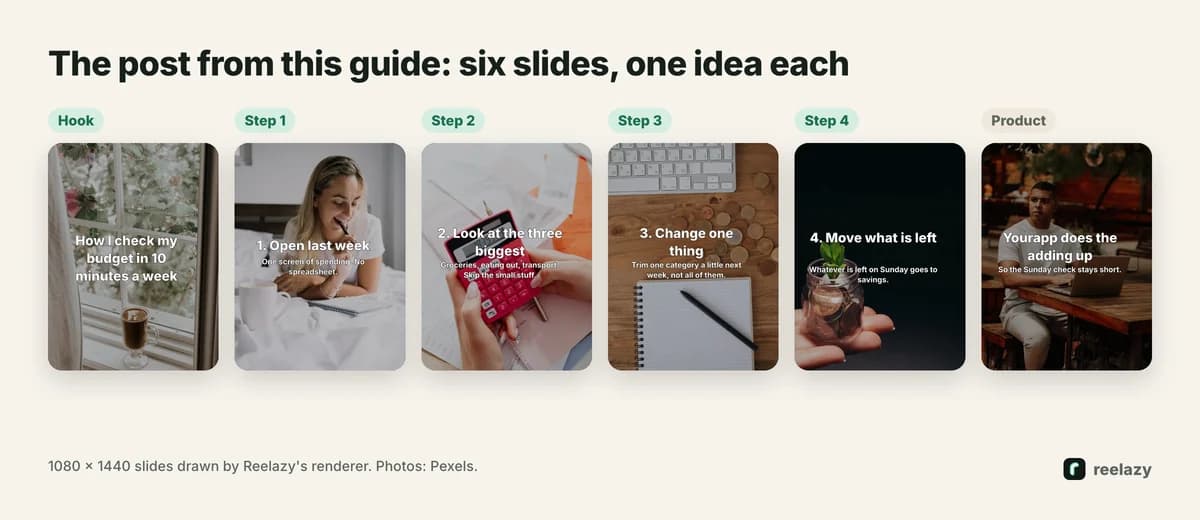
Any editor that exports 1080 × 1440 JPEGs works: Canva, Figma, or the phone's own editor. If you make several a week, a tool that keeps the size and the text position for you saves the most time.
Add a sound and text to the slideshow
The sound is added in step 4, with Add sound at the top of the editor. It plays while people swipe. Two things trip people up:
- Business accounts see fewer sounds. On a business account, TikTok shows only sounds from its Commercial Music Library, about a million songs cleared for brands (TikTok Ads help). That is expected, not a bug.
- Apps can't choose a song for you. When an app posts for you through TikTok's API, it can only ask TikTok to add recommended music, or leave the sound to you.
The full walk-through, with the business account rules, is in how to add music to a TikTok slideshow.
For text, TikTok's Text tool is fine for a quick post. For a series, put the text on the image before you upload, so every post has the same font, size and position.
How many photos to use
TikTok allows up to 35, but a product post rarely needs more than 8. Count the slides from what you have to say: one hook, one slide per point, one slide for the product. Five tips make a seven-slide post. If a slide doesn't give a reason to swipe again, cut it. How many slides in a TikTok slideshow has the counts for other kinds of post, and 16 TikTok slideshow ideas has hooks to start from.
Posting a slideshow from another app
You don't have to post from your phone. Apps can send photo posts through TikTok's official Content Posting API, in one of two ways:
| Inbox draft | Direct post | |
|---|---|---|
| Where it lands | Your TikTok inbox | Your profile, at the scheduled time |
| What you do | Open it in TikTok, add a sound, tap Post | Nothing, after you approve it in the app |
| Sound | Any sound you pick | TikTok's recommended music, if you ask for it |
The API takes up to 35 images per post, JPEG or WebP, up to 20 MB each (media transfer guide). TikTok also caps inbox drafts at 5 waiting in any 24 hours per account (upload reference). The details, including what an app can't do, are in the TikTok Content Posting API for photo posts.
This is how Reelazy works. You find a TikTok slideshow that works and save it with the Chrome extension or a screenshot. Reelazy copies its format (the structure, the hook pattern, the look, never its words or photos) and makes a month of posts like it for your product, at 1080 × 1440, with licensed photos or your own. You approve them, and they go to your TikTok inbox or straight to your profile at your times. See it for one kind of app in TikTok slideshows for budgeting apps, or for habit tracker apps.
When the slideshow doesn't look right
- The photos play as a video. You picked them outside photo mode. Start again from Photo.
- The top or bottom of every slide is missing. The slides are 9:16. Crop them to 1080 × 1440.
- Text hides behind the buttons. Move it out of the bottom-right corner and away from the top edge.
- The song you want isn't there. On a business account, only Commercial Music Library sounds show.
- Photo isn't on the camera screen. Update the app. TikTok has rolled photo features out over time, and the labels can differ between versions.
Once the first one is out, the hard part is the next thirty. Hooks that work for slideshows and the formats behind them make the writing faster. To get a month of posts made for your app, start free: Free includes 2 posts you can schedule to TikTok.
Frequently asked questions
How do you make a slideshow on TikTok?
Tap +, choose Photo, tap Upload and pick up to 35 photos in order. Tap Next, add a sound and any text, tap Next again, write the description and tap Post.
How many pictures can a TikTok slideshow have?
Up to 35 images in one post, both in the app and through TikTok's posting API. Most product posts work best with 5 to 8, one idea per slide.
What size should TikTok slideshow photos be?
1080 × 1440 pixels, a 3:4 ratio. TikTok shows photo posts in a 3:4 window, so a 9:16 photo loses about 240 px at the top and the bottom.
Why does my TikTok slideshow play like a video?
You picked the photos in video mode, which turns them into a video with transitions. Go back, choose Photo, then Upload, and pick them again.
Can I make a TikTok slideshow and post it later?
Yes. Tap Drafts instead of Post, and the post stays on your profile, visible only to you, until you finish it. An app that uses TikTok's API can also schedule it for you.
Can I make a TikTok slideshow without the app?
You can make the slides anywhere, then send them with an app that uses TikTok's Content Posting API. It puts them in your TikTok inbox, or posts them straight to your profile once you approve them.