TikTok's AI-generated label: when a slideshow needs it
When a TikTok slideshow needs the AI-generated content label, which slides trigger it, how apps set is_aigc, and what TikTok really says about reach.
· 7 min read · by Reelazy
A slideshow for an app is mostly photos and text, until one slide has something an AI made: a chart, a drawing, a photo. Does that post need TikTok's AI-generated label, and does the label cost views? This page puts TikTok's own words (Help Center, Community Guidelines, developer docs, all read on November 20, 2026) next to the slides of one post, and shows what an app sends when it posts for you.
The creator label and the auto label
TikTok's Help Center page About AI-generated content describes two labels:
- Creator label. You turn it on, or the app posting for you does. It reads "creator labeled as AI-generated". It is not a blanket setting: "misleadingly labeling unaltered content with this label is a violation of our Terms of Service and may result in the removal of content".
- Auto label. TikTok "may automatically apply the 'AI-generated' label" when you use its AI effects or upload content that has C2PA Content Credentials attached (metadata that records how a file was made). An auto label stays: "you won't be able to remove the label from your post".
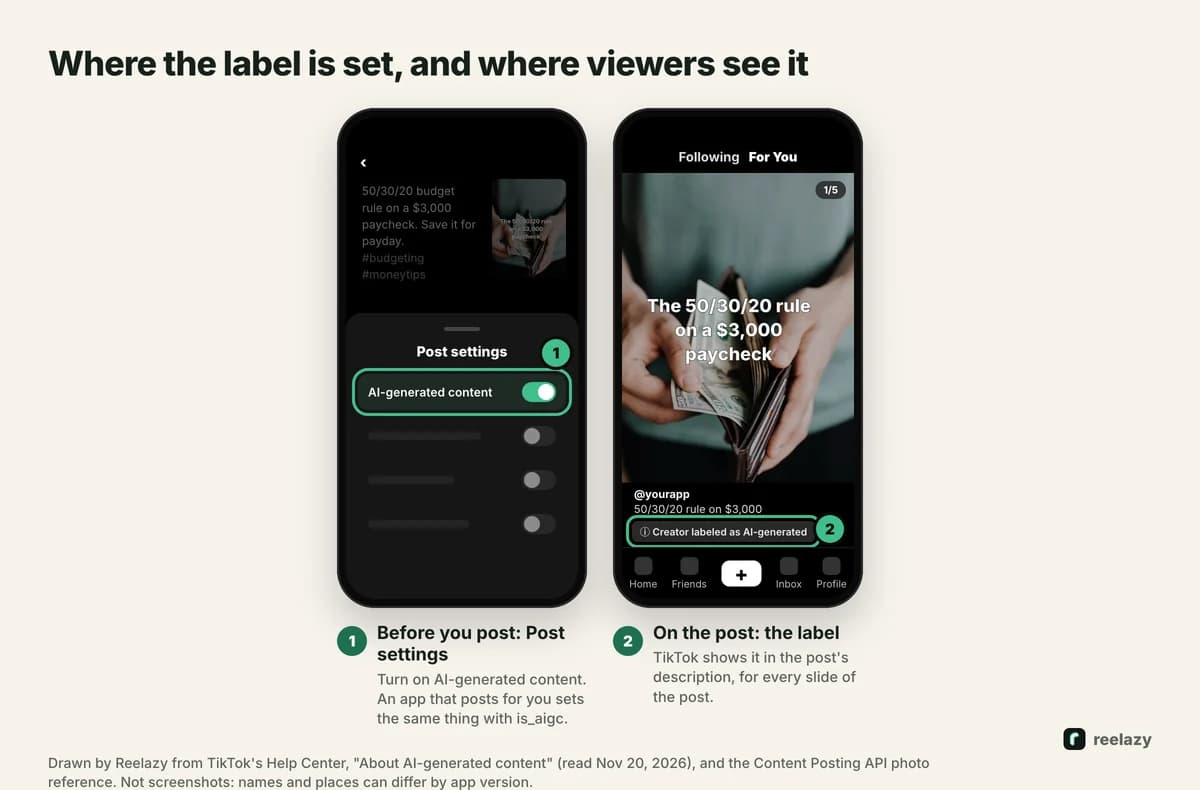
In the app, a photo post gets the creator label before you post: Post settings, then turn on AI-generated content. TikTok also accepts your own words: "text, a hashtag sticker, or context in the post's description".
Which slides in a slideshow need the label
Two of TikTok's pages decide it. The Help Center defines AI-generated content as "images, video and/or audio that is generated or modified by artificial intelligence". The Community Guidelines, in effect since September 24, 2026, set the requirement: "we require creators to label AI-generated or significantly edited content that shows realistic-looking scenes or people". For other content made entirely by AI, the Help Center says "we encourage creators to label" it.
Applied to the slides of a product slideshow:
| On the slide | What TikTok's pages say | Label it? |
|---|---|---|
| Your own photo or a licensed stock photo, with text | Not AI-generated content | No |
| Words an AI tool wrote, on a real photo | AI content means "images, video and/or audio"; words aren't in it | No |
| Color correction, cropping, reframing | "Disclosure isn't needed" | No |
| A chart, table or simple drawing an AI made | Made by AI but not realistic: encouraged, not required | Yes, it's honest |
| A cartoon or anime-style AI picture | Not required for artistic styles; encouraged for content made entirely by AI | Yes, it's honest |
| A realistic AI photo of a person or a place | Required | Yes |
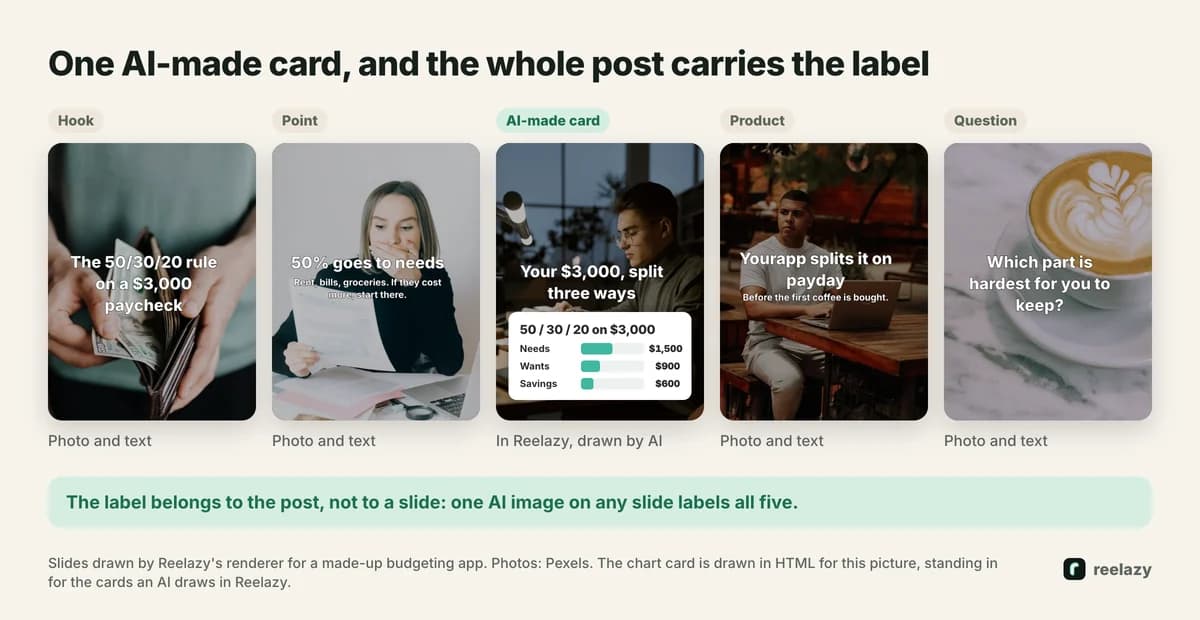
The label belongs to the whole post. Through the API it is one field per post, so one AI-made card on slide 3 labels all five slides, the hook included.
How an app sets the label
A tool that posts through TikTok's official Content Posting API sets the label with one optional field, is_aigc:
- Photo posts: it sits at the top of the request, next to
post_mode. TikTok's photo reference: "Set totrueif the photo is AI generated content. If set, the photo will be labeled with an AI-generated tag in the description." - Videos: it sits inside
post_info, and the video reference names the tag: "Creator labeled as AI-generated".
An app that leaves the field out never sets the label for you, and TikTok's rule still applies to your post. So when a tool puts AI images on your slides, check that it sets is_aigc and tells you before the post goes out.
Will TikTok spot AI images in your slides on its own?
Sometimes. TikTok's newsroom (November 24, 2025) lists its methods: "labeling tools we offer creators as well as our own detection models", plus C2PA Content Credentials. The same post names the weak spot: "these kinds of labels may be removed when content is reuploaded or edited elsewhere".
A slide is that kind of edit: a picture, a background and text, exported as a new file. Whether the file keeps the picture's Content Credentials depends on the tool that exports it. Reelazy's renderer draws every slide fresh and saves a plain JPEG, so none reach TikTok. The rule is about what the post shows, not what TikTok can detect, so set the label yourself.
Does the AI-generated label cut reach?
TikTok's answer, under its steps for turning the label on: "Turning on the AI-generated content setting won't affect the distribution of your video as long as it doesn't violate our Community Guidelines." The sentence says "video"; the same page has steps for photo posts but no line about their distribution.
Viewers can matter too. On November 24, 2025, TikTok said it would "start testing" a control in Manage topics "to choose how much AIGC they want to see in their For You feeds". Its Manage topics help page doesn't mention AI content today, and TikTok hasn't said whether such a control reads the creator label. We have no data comparing labeled and unlabeled slideshows.
Leaving the label off is the bigger risk: for realistic AI content, "Unlabeled content may be removed, restricted, or labeled by our team". If a post gets low views, start with the usual causes in TikTok 0 views on a new account.
How Reelazy sets the label
Reelazy puts text on photos (its licensed library or yours) and can lay a chart, table or simple drawing over a photo as a card. An AI draws those cards, so:
- A post with a card carries the label. Reelazy sends
is_aigcfor it, to your inbox or straight to your profile; photos and text alone go without it. The server decides from the slides' images when you approve. - You see it first. The Direct approval window and the Post to TikTok window show AI-generated content switched on, with the note "This post has drawings Reelazy made, so TikTok will label it as AI-generated." It can't be switched off.
- Edits keep it right. Add a card after approving and the label is added when the slides are redrawn. It is never taken off.
Two gaps. TikTok's reference doesn't say whether an inbox draft keeps the flag once you finish it in the app, and we haven't checked it on a real post: on a draft with a card, look for the AI-generated content setting before you tap Post. And Reelazy only knows about pictures it made: for a realistic picture from another AI tool, download the slides and post them from the TikTok app with the setting on. Background photos explains where pictures come from, and why AI-written slides sound fake covers the words.
Frequently asked questions
Does the AI-generated label reduce views on TikTok?
TikTok says turning on the setting "won't affect the distribution of your video as long as it doesn't violate our Community Guidelines". The sentence is written for video, and TikTok gives no separate one for photo posts. In November 2025 TikTok also said it would test a setting that lets viewers see less AI content.
Can I remove the AI-generated label from a TikTok post?
Not an auto label: TikTok says "you won't be able to remove the label from your post". For the creator label, TikTok's Help Center doesn't say whether it can be turned off after posting. If the post shows realistic AI images, the label is required anyway.
Does AI-written text on a slide need the label?
Not under TikTok's definitions, which cover images, video and audio made or changed by AI. A slideshow of real photos with text an AI helped write doesn't need it.
Do stock photos need the AI-generated label?
No, unless the stock photo was itself made by AI and looks real. A licensed photo of a real scene is not AI-generated content.
What happens if I don't label AI content on TikTok?
For realistic AI content, TikTok's Community Guidelines say "Unlabeled content may be removed, restricted, or labeled by our team, depending on the harm it could cause." TikTok may also add its own auto label, which you can't remove.
Will TikTok detect AI images in my slides by itself?
Sometimes. TikTok reads C2PA Content Credentials and runs its own detection models, but says such labels "may be removed when content is reuploaded or edited elsewhere". A slide you export is a new file and may carry no Content Credentials, so set the label yourself.